sdgp
Utilization Synthetic data generator plus Project



For questions on this package contact the package Developer Damodhar Jangam at damodhar918@outlook.com
Overview
This project Synthetic data generator plus is a python script that generates mock data based on given configurations. It can also edit and scale existing data to create high volume data. It is useful for testing and prototyping purposes.
Features
- Generate mock data for different types of configuration items
- Edit the mock data and generate mock data for different types of configuration items
- Configuration rules include generating unique indices, fixed or random dates/times, categorical values, float values within a range, integer values within a range, or constant values.
- Generate high volume data
- Save a DataFrame in CSV and Parquet file formats
- Futher can ingest into SQL server, HDFS, Hive, HBase, Kafka, etc.
Package Installation
Install on a Local Machine (optional)
Go through the following sequence:
- Clone repo
- Create a virtual environment and install the package
PS > python -m venv .venv
PS > .\.venv\Scripts\activate
PS > pip install -r requirements.txt
PS > python setup.py install
# You can utilize the package in this case by invoking sdgp.
PS > sdgp -h
# Before proceeding, please review the usage section.
PS > sdgp -c m 1000000 csv test test_conf.csv
PS > sdgp -c e 1000000 parquet test test_conf.csv
PS > deactivate # when you need exit
Install on a edge node (optional)
Go through the following sequence:
- Clone repo
- Create a virtual environment and install the package
$ python3 -m venv .venv
$ source .venv/bin/activate
$ pip install -r requirements.txt
$ python setup.py install
# You can utilize the package in this case by invoking sdgp.
$ sdgp -h
# Before proceeding, please review the usage section.
$ sdgp -c m 1000000 csv test test_conf.csv
$ sdgp -c e 1000000 parquet test test_conf.csv
$ deactivate # when you need exit
You are nowready to proceed, as the package Synthetic data generator plus has been installed and is now available for utilization within your virtual environment.
Usage
To run the script, you need to provide some arguments:
-cor--choice: The type of function to select.mfor mock data,efor edit mock data,gfor generate high volume data.volume: The size. An integer value that specifies how many rows/records to generate mock data. Recommended minimum value more than 1000.format: The type of format to save the mock data.csvfor CSV format,parquetfor Parquet format.csv_file: The CSV file name. A string value that specifies the name of the CSV file to read if there or to write output.conf_csv_file: The configuration CSV file name. A string value that specifies the name of the configuration CSV file to read. This argument is required if mode iseorg. Example configuration file:
| name | type | values |
|---|---|---|
| id1 | uniqueIndex | 800000000 |
| date1 | date | 2022-10-26 |%Y-%m-%d |
| time1 | time | 00:00:00|23:59:59 |
| dateRange1 | dateRange | 2021-10-10 | 2022-10-26 |%Y-%m-%d |
| incometime2 | dateRange | 2021-10-10 | 2022-10-26 |%Y-%m-%d %H:%M:%S |
| outcometime3 | dependentDateRange | incometime2|1D|3W|%Y-%m-%d %H:%M:%S |
| model1 | category | Customers|Lending|Web_Lending |
| model | category | Customers|Lending|Web_Lending | |
| null1 | category | | |
| gender1 | category | 0|1|~0.4|0.5|0.1 |
| probability1 | floatRange | 0.001|1|3 |
| float1 | floatRange | 0.001|0.3|5 |
| number1 | intRange | 10|25 |
| test1 | constant | Done |
| name1 | regexPattern | ([a-z]{3,10})\, ([a-z]{3,10}) |
| phone_number | regexPattern | (+[4-9]{2,3})-([4-9]{5})-([4-9]{5}) |
| zip_code | regexPattern | ([4-9]{5}) |
| email_address | regexPattern | ([a-zA-Z0-9]{1,10})\@[a-z]{1,5}.(com|net|org|in) |
| compositeKey | composite | dateRange1 | model1 |number1 |phone_number|zip_code |
name,type,values
id1,uniqueIndex,800000000000000000000000000000
date1,date,2022-10-26|%Y-%m-%d
time1,time,00:00:00|23:59:59|%H:%M:%S
dateRange1,dateRange,2021-10-10 | 2022-10-26|%Y-%m-%d
incometime2,dateRange,2021-10-10 | 2022-10-26|%Y-%m-%d %H:%M:%S
outcometime3,dependentDateRange,incometime2|1D|3W|%Y-%m-%d %H:%M:%S
model1,category,Customers|Lending|Web_Lending
model,category,Customers|Lending|Web_Lending|
null1,category,
gender1,category,0|1|~0.4|0.5|0.1
probability1,floatRange,0.001|1|3
float1,floatRange,0.001|0.3|5
number1,intRange,10|25
test1,constant,Done
name1,regexPattern,"([a-z]{3,10})\, ([a-z]{3,10})"
phone_number,regexPattern,"(\+[4-9]{2,3})\-([4-9]{5})\-([4-9]{5})"
zip_code,regexPattern,([4-9]{5})
email_address,regexPattern,"([a-zA-Z0-9]{1,10})\@[a-z]{1,5}\.(com|net|org|in)"
compositeKey1,composite,dateRange1|model1|number1|phone_number|zip_code
Explanation of data patterns as per defined in the configuration file :
uniqueIndex: This indicates that theid1column should contain unique and sequential values,here it’s starting from800000000000000000000000000000.date: This indicates that thedate1column should contain a fixed date value (2022-10-26) for all rows.%Y-%m-%dformat is used.time: This indicates that thetime1column should contain random time values between00:00:00and23:59:59here you can pass reqired format like%H:%M:%S.dateRange: This indicates that thedateRange1andincometime2columns should contain random date values within the range from2021-10-10to2022-10-26. The format of the dates inincometime2also includes%Y-%m-%d %H:%M:%S. For other formats reference given below.dependentDateRange: This indicates that theoutcometime3column should contain random duration values within the range from1Dto3Win addition to theincometime2.Here1Dmeans 1 day and3Wmeans 3 weeks. Other compatable inputs are10Smeans 10 seconds,5mmeans 5 minutes,2hmeans 2 hours,3dmeans 3 days,4Wmeans 4 weeks. The format of the dates inoutcometime3also includes%Y-%m-%d %H:%M:%S. format reference given below.category: This indicates that themodel1column should contain random categorical values chosen from the options “Customers”, “Lending”, and “Web_Lending”. Note 1: If you want to add some empty value in the column then add|at the end of the values as inmodel. Note 2: If you want categorical values with probilities then add~at the end of the values as ingender1input0|1|~0.4|0.5|0.1. here ~ is seperater between categorical values and probilities [“0”, “1”,””] ~ [“0.4”, “0.5”, “0.1”]. Note 3: If you want full null/empty values in the column then add|at the end of the values as innull1column.floatRange: This indicates that theprobability1andfloatcolumns should contain random float values within a given range. The range forprobability1is from0.001to1, with a precision of 3 decimal places. The range forfloatis from0.001to0.3, with a precision of 5 decimal places.intRange: This indicates that thenumber1column should contain random integer values within the range from 10 to 25.constant: This indicates that thetest1column should contain a constant value (Done) for all rows.regexPattern: This indicates that thename1column should contain a fixed pattren range value (([a-z]{3,10})\, ([a-z]{3,10})) for all records. Thephone_numbercolumn should contain a fixed length phone number value ((\+[4-9]{2,3})\-([1-9]{5})\-([1-9]{5})) for all records. Thezip_codecolumn should contain a fixed length zip code value (([4-9]{5})) for all records.email_addresscolumn should contain a fixed length email address value (([a-zA-Z0-9]{1,10})\@[a-z]{1,5}\.(com|net|org|in)) for all records. For more regex pattren check here and play around with it. Note: regexPattern takes long time to generate data.composite: This indicates that thecompositeKey1column should contain sha256 hashed value from these combinations:dateRange1|model1|number1|phone_number|zip_code
Each row in this CSV file defines a rule for generating or handling data in a specific column of another dataset. The rules include generating unique indices, fixed or random dates/times, categorical values, float values within a range, integer values within a range, or constant values.
datetime formats you can use in the script:
%a: Weekday as locale’s abbreviated name. Example: Mon%A: Weekday as locale’s full name. Example: Monday%w: Weekday as a decimal number, where 0 is Sunday and 6 is Saturday. Example: 1%d: Day of the month as a zero-padded decimal number. Example: 30%b: Month as locale’s abbreviated name. Example: Sep%B: Month as locale’s full name. Example: September%m: Month as a zero-padded decimal number. Example: 09%y: Year without century as a zero-padded decimal number. Example: 99%Y: Year with century as a decimal number. Example: 2013%H: Hour (24-hour clock) as a zero-padded decimal number. Example: 07%I: Hour (12-hour clock) as a zero-padded decimal number. Example: 07%p: Locale’s equivalent of either AM or PM. Example: AM%M: Minute as a zero-padded decimal number. Example: 06%S: Second as a zero-padded decimal number. Example: 05
To run the script, use the following command:
sdgp -c <choice> <volume> <format> <csv_file> <conf_csv_file>

positional arguments:
  volume                The size. An integer value that specifies how many rows to generate mock data. Recommended
                        minimum value is more than volume size or more than 1000.
  {csv,parquet}         The type of format to save the mock data. csv for CSV format, parquet for Parquet format.
  csv_file              The CSV file name. A string value that specifies the name of the CSV file to read or write.
  conf_csv_file         The configuration CSV file name. A string value that specifies the name of the configuration
                        CSV file to read. This argument is required if mode is e or g.
options:
  -h, --help            show this help message and exit
  -c {m,e,g}, --choice {m,e,g}
                        The type of function to select. m for mock data, e for edit mock data, g for generate high
                        volume data.
For example:
sdgp -c m 50000 csv mock_table conf.csv # Generate 50000 rows of mock data and save as mock_table_50000.csv
sdgp -c e 100000 parquet edit_table.csv conf.csv # Along with given data can edit with conf.csv, generate 100000 recrds and save as edit_table_100000.parquet\n
sdgp -c g 1000000 csv scale.csv # Generate 1000000 rows of mock data by scaling existing data and save as scale_1000000.csv
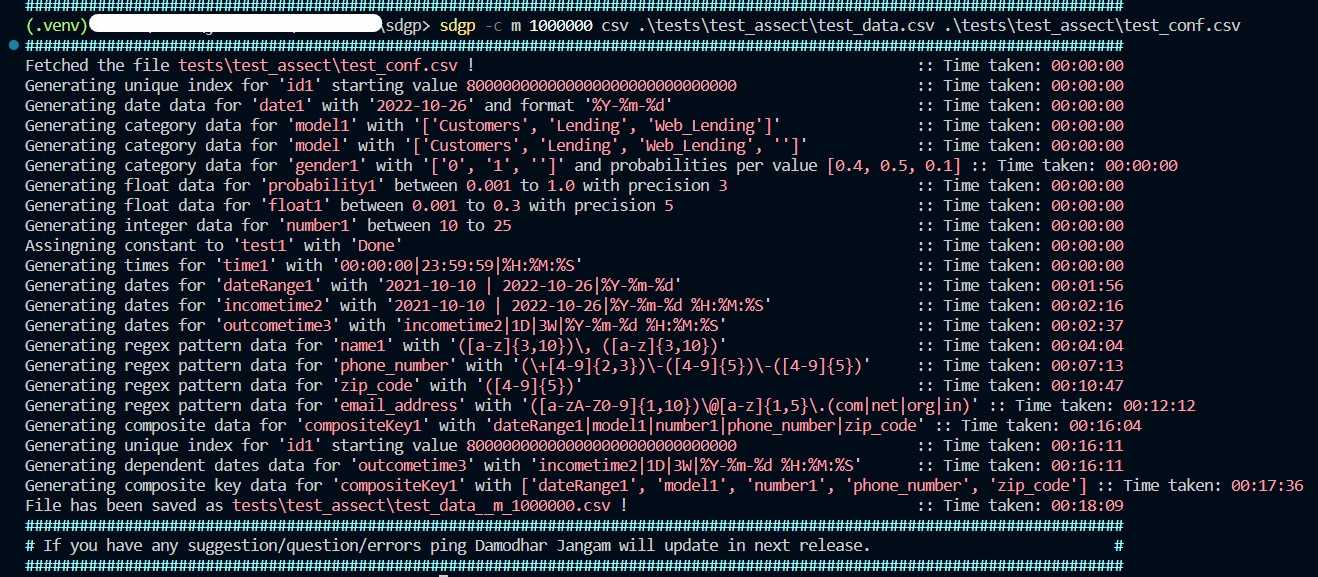
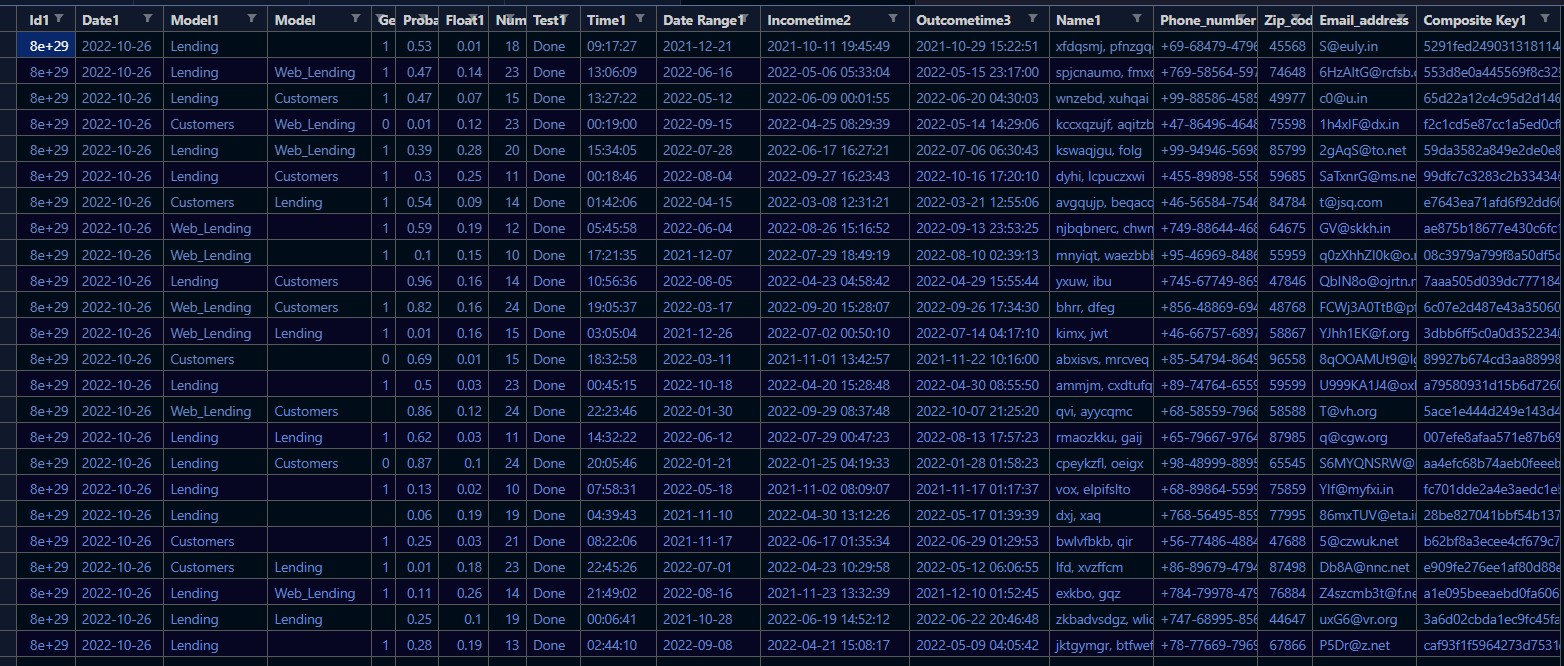
Sample output for sdgp -c m 1000000 csv test .\test_conf.csv:
id1,date1,model1,model,gender1,probability1,float1,number1,test1,time1,dateRange1,incometime2,outcometime3,name1,phone_number,zip_code,email_address,compositeKey1
800000000000000000000000022022,2022-10-26,Lending,,1,0.526,0.01349,18,Done,09:17:27,2021-12-21,2021-10-11 19:45:49,2021-10-29 15:22:51,"xfdqsmj, pfnzgqd",+69-68479-47968,45568,S@euly.in,5291fed2490313181144993e6f9d0e478a774cbe
800000000000000000000000069854,2022-10-26,Lending,Web_Lending,1,0.466,0.13702,23,Done,13:06:09,2022-06-16,2022-05-06 05:33:04,2022-05-15 23:17:00,"spjcnaumo, fmxd",+769-58564-59786,74648,6HzAItG@rcfsb.com,553d8e0a445569f8c329c4f2cad5bd0a217e2cf8
800000000000000000000000052417,2022-10-26,Lending,Customers,1,0.474,0.07092,15,Done,13:27:22,2022-05-12,2022-06-09 00:01:55,2022-06-20 04:30:03,"wnzebd, xuhqai",+99-88586-45856,49977,c0@u.in,65d22a12c4c95d2d14615f9d5b4c6582cd60c45f
800000000000000000000000068698,2022-10-26,Customers,Web_Lending,0,0.012,0.12498,23,Done,00:19:00,2022-09-15,2022-04-25 08:29:39,2022-05-14 14:29:06,"kccxqzujf, aqitzbuj",+47-86496-46488,75598,1h4xIF@dx.in,f2c1cd5e87cc1a5ed0cf800bcb7228c3c4f621cb
License
This project is licensed under the MIT License - see the LICENSE file for details.
Acknowledgments
If you have any questions, feedback, or suggestions, please feel free to contact me at damodhar918@outlook.com. You can also open an issue or submit a pull request on GitHub if you want to contribute to this project. I hope you find this project useful and interesting. Thank you for reading! 😊